Forum Migration Notice
Update (2026-01-21): The user forums are now in read-only mode pending the data migration.
Update (2026-01-12): The user forums will be put into read-only mode on the 21st of January, 00:00 CET, to prepare for the data migration.
We're transitioning to a more modern community platform by beginning of next year. Learn about the upcoming changes and what to expect.
Update (2026-01-12): The user forums will be put into read-only mode on the 21st of January, 00:00 CET, to prepare for the data migration.
We're transitioning to a more modern community platform by beginning of next year. Learn about the upcoming changes and what to expect.
Robotware 5.12 installation

tmagee
✭
in RobotStudio
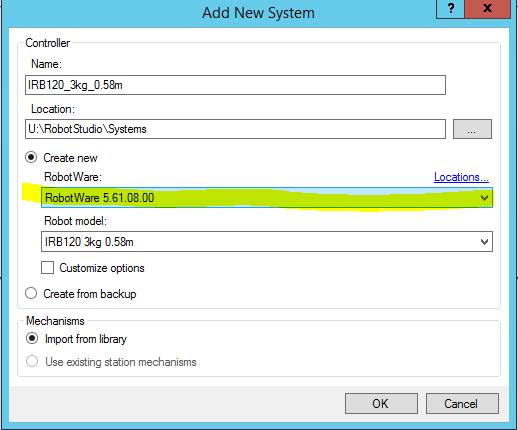
I have tried to download robotware 5.12.04 into robotstudio 6.07. The installation works and the two files show up in the mediapool. However, when I try to create a new system robotware 5.12.04 doesn't show up as an option. I tested the same process with robotware 5.61. The files are in the same place as 5.12. However, 5.61 does show up as an option when creating a new system. Here is the screenshot showing the files in mediapool.

Tagged:
0
Comments
-
Are you using the system builder or installation manager? Try system builder if not.Lee Justice0
-
Hi,
The supported RobotWare versions when creating a VC are:
- System Builder - all 5.x versions
- From Layout - 5.15 and higher
- Template systems (New System and Solution with VC) - 5.6x and higher
So for 5.12 you must use System Builder.
Johannes Weiman
Software Engineer
RobotStudio Team, ABB Robotics0


Categories
- All Categories
- 5.7K RobotStudio
- 402 UpFeed
- 21 Tutorials
- 16 RobotApps
- 307 PowerPacs
- 407 RobotStudio S4
- 1.8K Developer Tools
- 251 ScreenMaker
- 2.9K Robot Controller
- 368 IRC5
- 92 OmniCore
- 8 RCS (Realistic Controller Simulation)
- 859 RAPID Programming
- 43 AppStudio
- 4 RobotStudio AR Viewer
- 19 Wizard Easy Programming
- 111 Collaborative Robots
- 5 Job listings