Update (2026-01-12): The user forums will be put into read-only mode on the 21st of January, 00:00 CET, to prepare for the data migration.
We're transitioning to a more modern community platform by beginning of next year. Learn about the upcoming changes and what to expect.
AppStudio Won’t Uninstall? Here’s How to Fix It

When you’re trying to install a new version of AppStudio, you may run into an issue where AppStudio cannot be uninstalled 😵💫
You’ll see an error message similar to this:
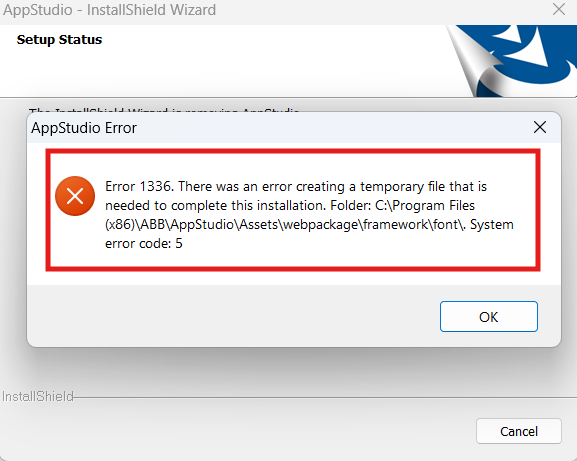
So how can we fix it?
From the error message, we can tell that some font resources used by AppStudio are currently being locked by other processes. To resolve this, we need to identify and stop those processes.
Method 1: Restart your computer and try uninstalling again
A simple reboot can release the locked resources, allowing the uninstallation to proceed normally.
Method 2: Close related applications
Common applications that may be using AppStudio resources include:
-
Web browsers (Edge, Chrome, etc.)
-
Microsoft Word
-
PowerPoint
-
OneNote
Try closing these applications completely, then attempt to uninstall AppStudio again.
Still can’t uninstall it?
Method 3: Use Windows tools to find the locking process
If the issue persists, you can use a built-in Windows tool to identify which process is holding the files.
-
Press Win + R, type
resmon, and press Enter to open Resource Monitor. -
Go to the CPU tab.
-
In the Associated Handles search box, enter AppStudio’s installation path, for example:
C:\Program Files (x86)\ABB\AppStudio\Assets\webpackage -
Wait a moment to see which process is using the files.
-
Select and close the related processes.
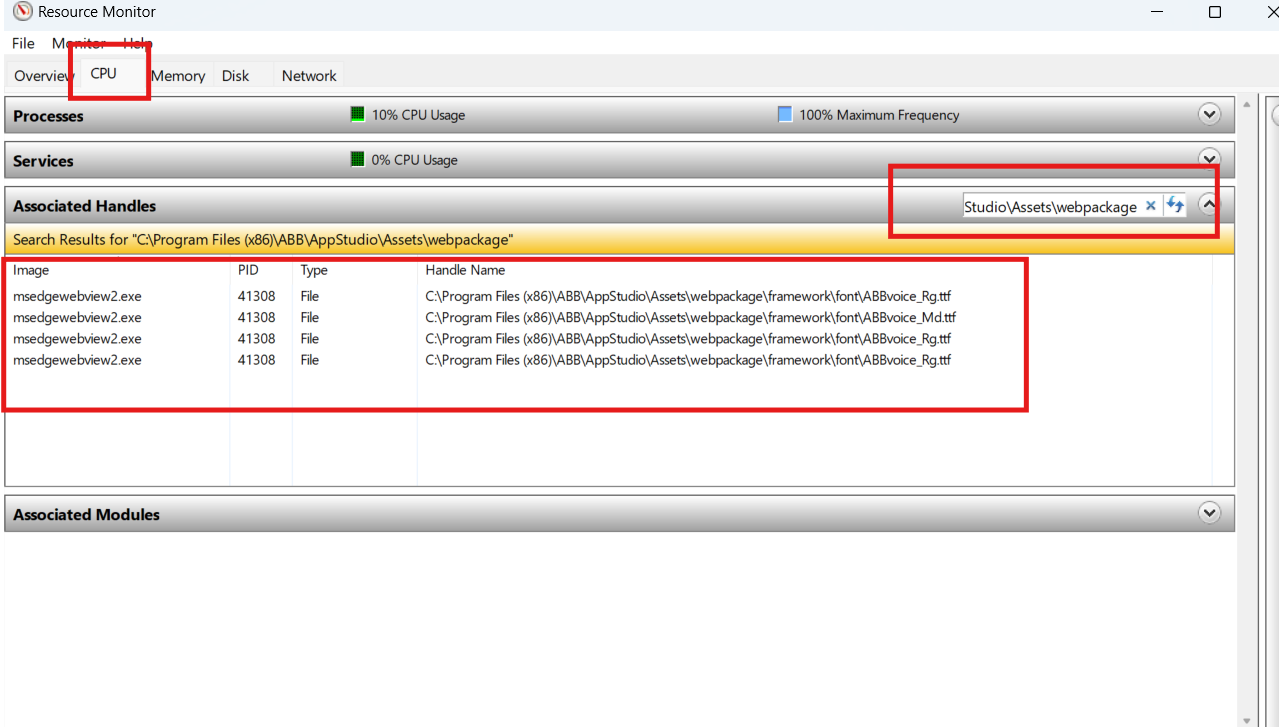
⚠️ Note: Ending a process may cause other applications to behave unexpectedly 🤯
Make sure it’s safe before closing any process 😆
After that, try uninstalling AppStudio again.
Comments
-
Most of the times it just works if you close all other programs.0

Categories
- All Categories
- 5.7K RobotStudio
- 402 UpFeed
- 21 Tutorials
- 16 RobotApps
- 307 PowerPacs
- 407 RobotStudio S4
- 1.8K Developer Tools
- 251 ScreenMaker
- 2.9K Robot Controller
- 368 IRC5
- 92 OmniCore
- 8 RCS (Realistic Controller Simulation)
- 859 RAPID Programming
- 43 AppStudio
- 4 RobotStudio AR Viewer
- 19 Wizard Easy Programming
- 111 Collaborative Robots
- 5 Job listings