Forum Migration Notice
Update (2026-01-21): The user forums are now in read-only mode pending the data migration.
Update (2026-01-12): The user forums will be put into read-only mode on the 21st of January, 00:00 CET, to prepare for the data migration.
We're transitioning to a more modern community platform by beginning of next year. Learn about the upcoming changes and what to expect.
Update (2026-01-12): The user forums will be put into read-only mode on the 21st of January, 00:00 CET, to prepare for the data migration.
We're transitioning to a more modern community platform by beginning of next year. Learn about the upcoming changes and what to expect.
How to Use OmniCoreAppSDK components in AppStudio

In the new AppStudio version, you can get help by referring to the API Documentation.
introduction/FPComponents.html
The basic components of AppStudio are currently developed based on the OmniCoreAppSDK components.
AppStudio is fully compatible with OmniCoreAppSDK components.
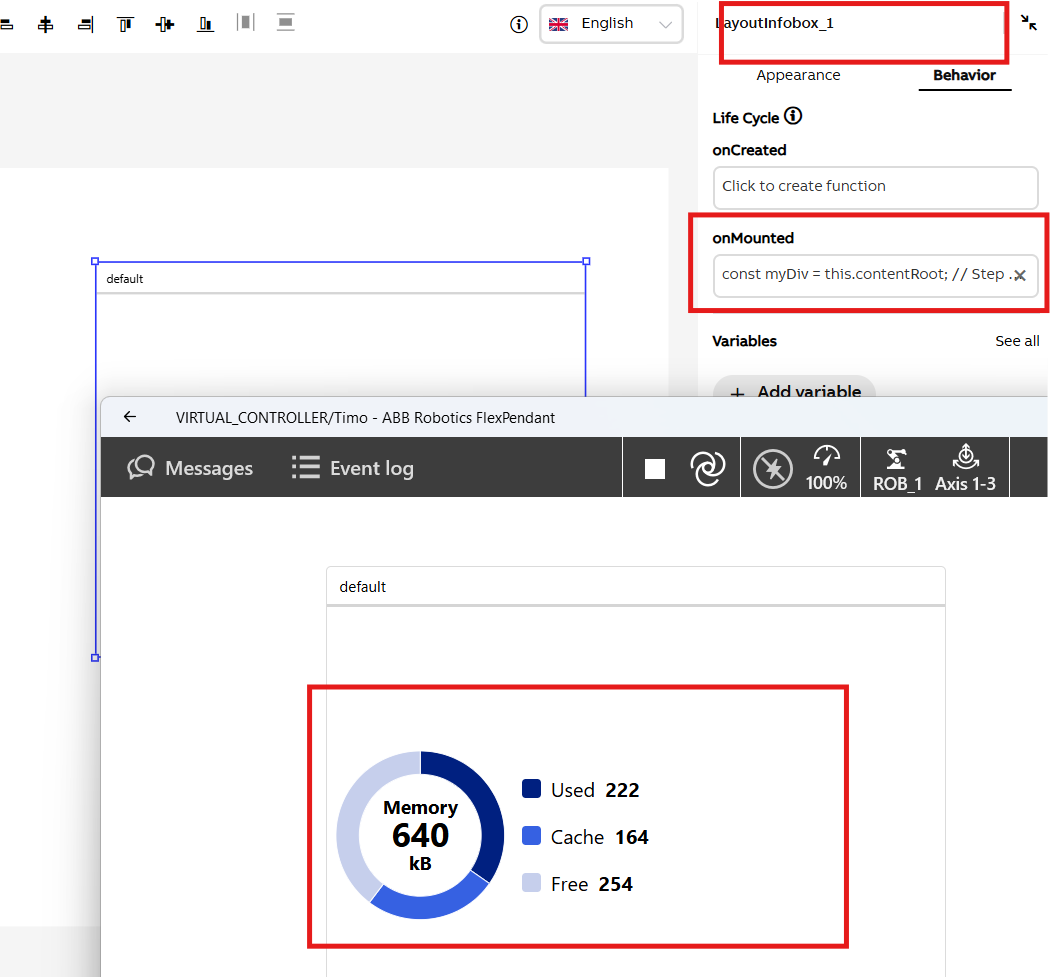
Finally, deploy the application to view the result.
introduction/FPComponents.html
The basic components of AppStudio are currently developed based on the OmniCoreAppSDK components.
AppStudio is fully compatible with OmniCoreAppSDK components.
Below is an example showing how to use OmniCoreAppSDK within AppStudio: Creating a Pie Chart component
If you want to place an OmniCoreAppSDK component inside a layoutinfobox component. To do this, you need to create a new project in AppStudio and drag a layoutinfobox component into it.
Then, add the following code inside the onMounted function of the layoutinfobox component.
// Step 1: Get the container html element of the layoutinfobox component.
const myDiv = this.contentRoot;

// Step 2: Create pie chart base on FPComponents API.
var myDonut = new FPComponents.Piechart_A();
myDonut.model = [
[222,  'Used' ],
[164,  'Cache' ],
[254,  'Free' ],
];
myDonut.topText = "Memory";
myDonut.centerText = "640";
myDonut.bottomText = "kB";
myDonut.size = 150;

// Step 3: Attach the pie chart to layoutinfobox.
myDonut.attachToElement(myDiv);
Finally, deploy the application to view the result.
Post edited by yitong on
0
Categories
- All Categories
- 5.7K RobotStudio
- 402 UpFeed
- 21 Tutorials
- 16 RobotApps
- 307 PowerPacs
- 407 RobotStudio S4
- 1.8K Developer Tools
- 251 ScreenMaker
- 2.9K Robot Controller
- 368 IRC5
- 92 OmniCore
- 8 RCS (Realistic Controller Simulation)
- 859 RAPID Programming
- 43 AppStudio
- 4 RobotStudio AR Viewer
- 19 Wizard Easy Programming
- 111 Collaborative Robots
- 5 Job listings